Reinstall ActionFlow (& delete browsing history)
Occasionally, ActionFlow may not upgrade properly. In these situations, an old version of ActionFlow may be embedded in the browsing history of the computer. To resolve the issue, you must delete the browsing history and reinstall a fresh version of ActionFlow.
The three steps below should only take one or two minutes. If you follow these steps and still have problems, please call ActionFlow at 314-283-2619.
The three steps below should only take one or two minutes. If you follow these steps and still have problems, please call ActionFlow at 314-283-2619.
1) Delete browsing history in Internet Explorer
Open Internet Explorer (it must be Internet Explorer and not Edge or Chrome or another browser). Then, open the Internet Options under the Settings menu.

Next, click the button to delete the browsing history:
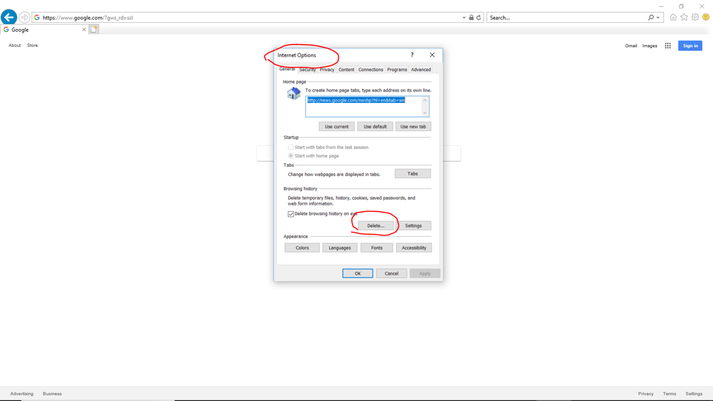
When prompted by Internet Explorer to indicate which items to delete, make sure you include the options indicated below:

2) Uninstall ActionFlow
The instructions below show how to uninstall ActionFlow in Windows. First, open the Control Panel and select Uninstall Program.

Uninstall ActionFlow from your computer.
(Note: In Windows 10, there is an alternative screen to remove Apps & Features that looks different than the screen below. That alternative screen accomplishes the same goal, which is to uninstall ActionFlow from your computer)

